
How do I check that the self propel cable is tensioned correctly on my Petrol Lawnmower
Created by Chris McHale, Modified on Tue, 30 Jun at 4:31 PM by Chris McHale
Quick Answer
If your self-propel system is not engaging properly, the most common cause is incorrect cable tension. The cable should have a small amount of free play (typically 5–10 mm). Too much slack will prevent the drive system from engaging correctly.
⚠️ Safety Notice
Before carrying out any checks or adjustments:
- Ensure the mower is switched off and cannot start accidentally
- Disconnect the spark plug cap where possible
- Keep hands away from moving parts
- Work on a flat, stable surface
Do not operate the mower with damaged cables or exposed drive components.
Visual Guidance
Please refer to the accompanying video for a visual demonstration of the cable adjustment procedure.
Understanding the Self-Propel System
The self-propel system works through several connected components:
- Self-propel drive cable
- Drive belt
- Gearbox and drive mechanism
If any of these components are worn, damaged, or incorrectly adjusted, the self-propel function may fail.
This guide focuses specifically on cable tension.
Checking the Self-Propel Cable
The self-propel cable runs from the handle lever down to the gearbox on the mower deck.
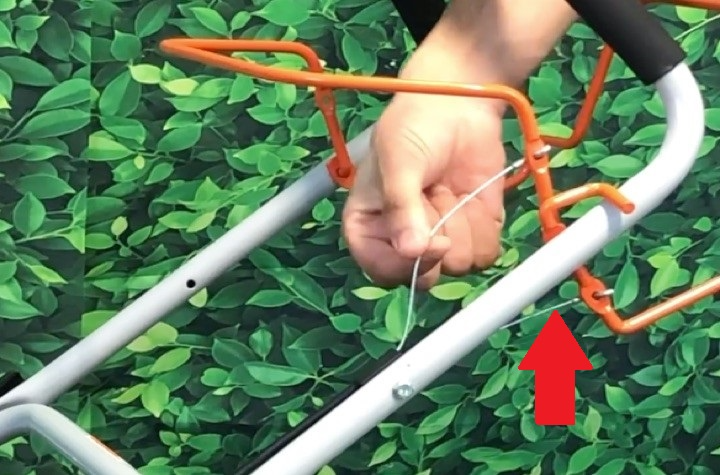
Step 1 – Inspect the Cable
- Locate the self-propel cable along the handle
- Check how much free movement (slack) is present
- Operate the self-propel lever and observe cable movement
Expected Tension
- 5–10 mm of free play = Normal
- More than 10 mm of free play = Likely too loose
- Very tight / no movement = Over-tensioned
If the cable is outside this range, adjustment is required.
Adjusting the Cable Tension
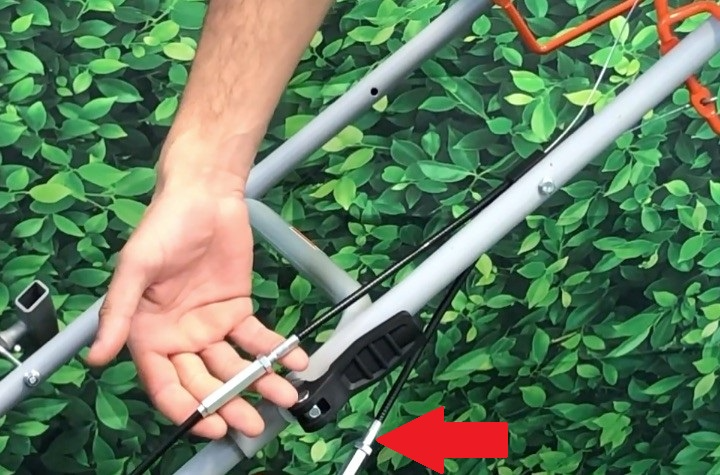
Step 1 – Locate the Barrel Adjuster
- Find the silver barrel adjuster along the cable
- This is usually positioned midway down the cable route
Step 2 – Loosen the Locking Nut
- Use the correct spanner (typically 8–12 mm depending on model)
- Loosen the locking nut at the top of the adjuster
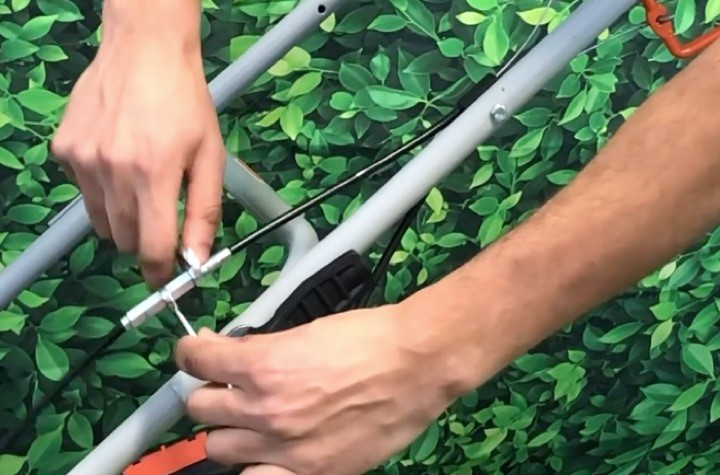
Step 3 – Adjust the Cable
- Turn the barrel adjuster to reduce slack
- Adjust gradually in small increments
- Check lever movement as you adjust
Aim for 5–10 mm of free play in the lever.
Step 4 – Secure the Adjustment
- Tighten the locking nut against the barrel adjuster
- Ensure the adjustment does not move when tightened
Step 5 – Test the Self-Propel System
- Operate the self-propel lever
- Check that the mower drives smoothly
- Ensure engagement is immediate and consistent
Additional Causes of Self-Propel Failure
If correct cable tension does not restore operation, check the following:
Drive Belt Issues
- Loose belt
- Worn belt
- Broken belt
- Belt slipped off pulley
Gearbox Problems
- Worn internal gears
- Seized drive mechanism
- Damaged drive pulley
Cable Damage
Inspect the cable for:
- Fraying
- Kinks or bends
- Rust or corrosion
- Broken inner cable
If any damage is found, the cable must be replaced.
Frequently Asked Questions
What is the correct self-propel cable tension?
Typically, the correct setting is 5–10 mm of free play at the control lever.
Why is my mower self-propel not engaging?
Common causes include:
- Loose cable tension
- Worn or broken drive belt
- Damaged gearbox components
- Stretched or frayed cable
Can I overtighten the self-propel cable?
Yes. Over-tightening can cause:
- Constant drive engagement
- Premature belt wear
- Increased strain on gearbox components
Do I need tools to adjust the cable?
Most models require a spanner (usually 8–12 mm) to loosen and tighten the locking nut on the barrel adjuster.
Was this article helpful?
That’s Great!
Thank you for your feedback
Sorry! We couldn't be helpful
Thank you for your feedback
Feedback sent
We appreciate your effort and will try to fix the article